
Check that buyers are excluded from prospecting
Prospecting ads are for new customers. Showing them to someone who bought last week, or to someone who never picks up the phone, is money spent for nothing. Two of your customer lists should be excluded from every prospecting ad set: Recent buyers and Bad leads.
1. Look for the alert
Section titled “1. Look for the alert”Open the Audiences tab. If an ad set is missing an exclusion, Needs attention says so:

2. Find which ad set
Section titled “2. Find which ad set”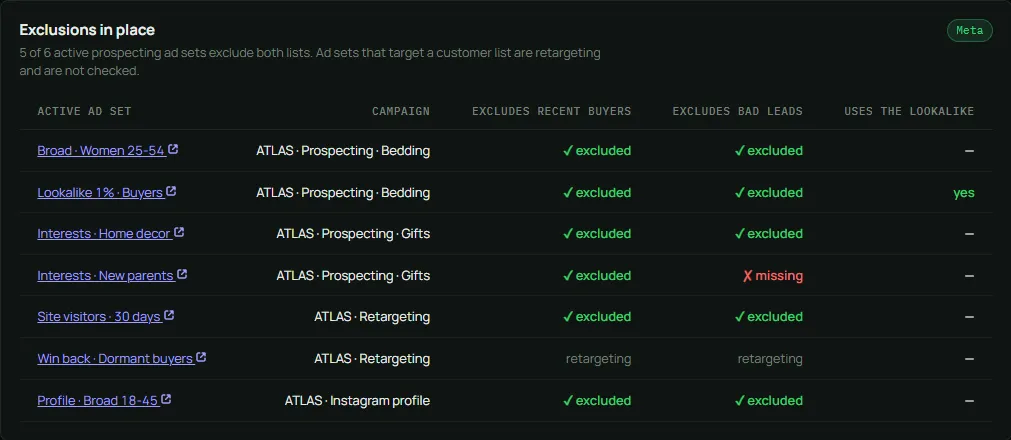
In Exclusions in place, each active ad set has one column per list to exclude: ✓ excluded or ✗ missing. At Maison Atlas, Interests · New parents excludes recent buyers but not bad leads.
An ad set that targets one of your lists is retargeting: it shows retargeting and is not checked — excluding your buyers there would empty it.
3. Fix it in Ads Manager
Section titled “3. Fix it in Ads Manager”The dashboard never changes a campaign. In Ads Manager:
- Open the ad set, then its Audience section.
- Under Custom audiences, choose Exclude.
- Add the missing list — it has your prefix in its name, like ATLAS — Bad leads.
- Publish.
4. Check the lists themselves are fresh
Section titled “4. Check the lists themselves are fresh”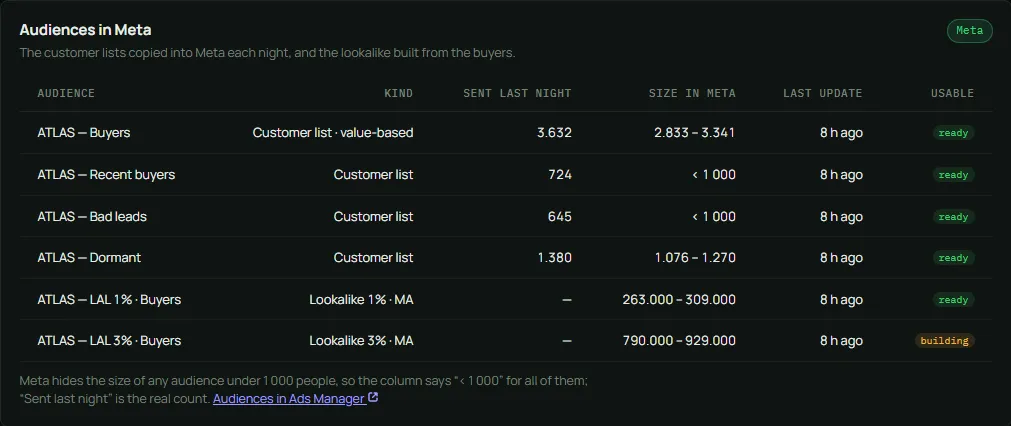
An exclusion only works if the list is up to date. In Audiences in Meta, Last update should be last night; a stale tag means Meta holds an old copy. Tell Rewire.
Which lists count as “must exclude” is set in Setup → Audiences.