
Your first analysis, A to Z
The first time you open the dashboard, go through it in this order. Each step takes a few minutes; together they answer do my ads pay, and what do I fix first?
1. Check the spend against Ads Manager, to the cent
Section titled “1. Check the spend against Ads Manager, to the cent”Before trusting any number, check the one both sides share: what you spent.
- On the Ads tab, open the date button, pick Last 30 days, tick Compare, press Update.
- In Ads Manager, open the same ad account, pick Last 30 days too, and read Amount spent in the total line at the bottom of the Campaigns table.
- Compare it with the Spend tile. They must be identical, to the cent — same currency (your ad account’s), same days, same timezone.
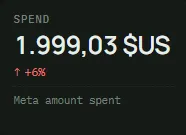
You can do the same with Results or Link clicks in the campaign table: they match Ads Manager too, because the Portal uses the same attribution setting.
2. Do the ads pay? — the Overview block
Section titled “2. Do the ads pay? — the Overview block”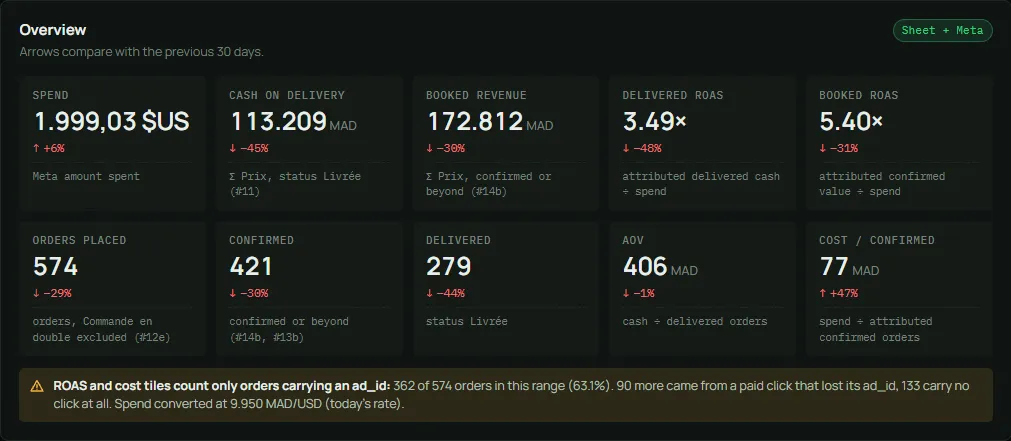
- Read Delivered ROAS: the real cash each dirham of ads brought back. Compare it with your target (Maison Atlas: at least 3.5 ×).
- Read Cost / confirmed: what one confirmed order costs. Maison Atlas wants it under 70 MAD.
- Look at the gap between Booked revenue and Cash on delivery: money confirmed but not collected yet — still on the road, or lost.
- Read the note under the tiles: how many orders carry an ad_id. The per-ad numbers only see those.
3. Is the business healthy? — the Business tab
Section titled “3. Is the business healthy? — the Business tab”- Confirmation rate — the first number to watch. If it fell, read Is my confirmation team the problem?
- Delivery rate — if it fell, read Why is my delivery rate falling?
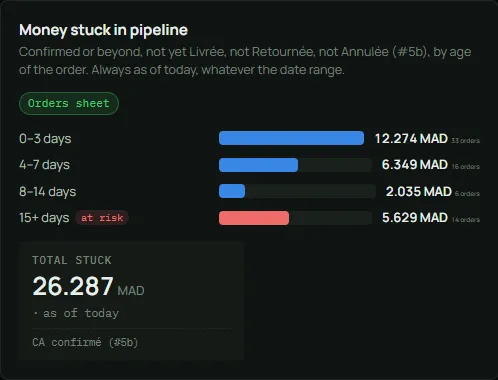
- Money stuck in pipeline: anything in 15+ days is at risk. Ask your courier about it.
4. Which ads work? — Winners and All ads
Section titled “4. Which ads work? — Winners and All ads”Back on the Ads tab, the Winners cards name your best ads. Then open All ads and click Cost / confirmed to sort: the red rows are the expensive ones. The full method is in Find the ads that lose money.
5. Where does the flow break? — the River
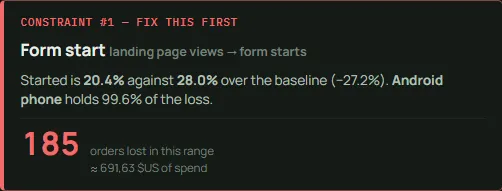
Section titled “5. Where does the flow break? — the River”Open the River tab and read the verdict at the top. At Maison Atlas it says the order form broke on Android phones. Read the River in 5 minutes explains the rest.
6. Are your customer lists working? — Audiences
Section titled “6. Are your customer lists working? — Audiences”Open Audiences. If a Needs attention block shows, deal with it first: a missing exclusion means you pay to show ads to people who just bought. See Check that buyers are excluded.
7. Ask for a second opinion — Recommendations
Section titled “7. Ask for a second opinion — Recommendations”Open Recommendations and press Run. In one to three minutes, Claude reads the same numbers and says what to do this week. See Run and read an analysis.
What to do after
Section titled “What to do after”Pick one thing: the River’s constraint, or the first ACT card. Do it this week, then come back next week on Last 7 days with Compare ticked and see whether it moved.