
Is my confirmation team the problem?
The confirmation rate is the share of orders your team turns into real sales. When it falls, there are two usual causes: the team (fewer calls, calls too late) or the orders themselves (an ad bringing people who never meant to buy). They don’t have the same fix.
1. Did it really fall?
Section titled “1. Did it really fall?”- On the Business tab, pick Last 30 days with Compare ticked.
- Read the Confirmation rate tile. The arrow shows the change in points against the previous 30 days.
- Compare it with your target (Maison Atlas: at least 65 %).
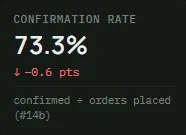
The last two or three days always look lower: their orders are still being called. Don’t count them.
2. When did it fall?
Section titled “2. When did it fall?”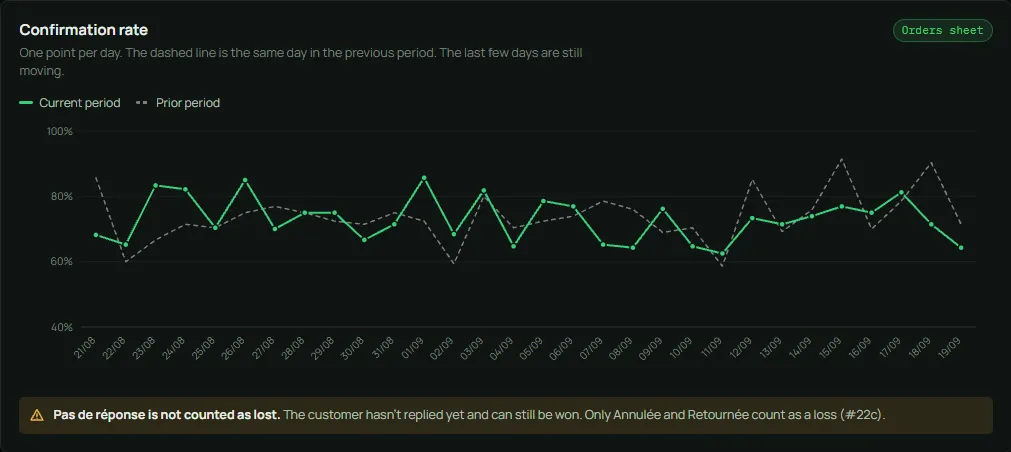
A sudden drop over a few days points at something that changed on those days: someone absent, a new person on the phones, a batch of bad orders. A slow slide over weeks is more often the team’s routine: calls made later and later.
3. Why were the orders lost?
Section titled “3. Why were the orders lost?”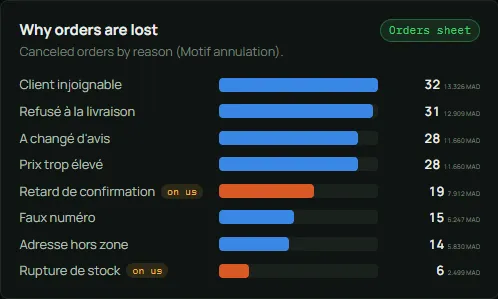
Look at the reasons in Why orders are lost:
- reasons tagged on us — at Maison Atlas, Retard de confirmation (called too late) and Rupture de stock (out of stock) — are the team’s or yours to fix;
- reasons like Faux numéro (wrong number) or Client injoignable (unreachable) point at the orders: people who were never going to buy.
Orders with no answer yet are not counted as lost: they can still be won. See no answer yet.
4. Is it one ad?
Section titled “4. Is it one ad?”On the Ads tab, in All ads, show the Orders placed and Confirmed columns. An ad with many orders but few confirmed is bringing the bad orders — its Cost / confirmed is red while its cost per order looks cheap. The Recommendations tab checks exactly this in its rule Cheap orders, expensive confirmations.
What to do
Section titled “What to do”| What you found | What to do |
|---|---|
| on us reasons rising, on every ad | talk to the team: call new orders sooner, and call back those with no answer yet |
| wrong numbers or unreachable customers, from one ad | lower that ad’s budget, or change what it promises |
| wrong numbers from everywhere | make sure Bad leads are excluded from your ads — see Check that buyers are excluded |
To be warned automatically, set Watch this loss reason rising in Setup → Recommendations: a rule fires when that reason rises by more than 20 %.