
Troubleshooting
Find the message you see on this page (Ctrl + F on Windows, ⌘ + F on a Mac, then type a few of its words). The Portal’s screens are in English; each message is quoted as it appears. When a fix says tell Rewire, contact us with a screenshot of the message.
On every tab
Section titled “On every tab”Could not reach Meta
Section titled “Could not reach Meta”
What it means. The dashboard could not read your ad account at all. Meta’s own reason follows the message.
Fix. Most often the key has expired (Error validating access token, code 190) or lost its access to the ad account. Open Setup → Meta, create a new key, paste it, Save.
Could not load the data
Section titled “Could not load the data”
What it means. The very first read failed, so there is nothing to show yet. The reason follows:
| The reason says | What to do |
|---|---|
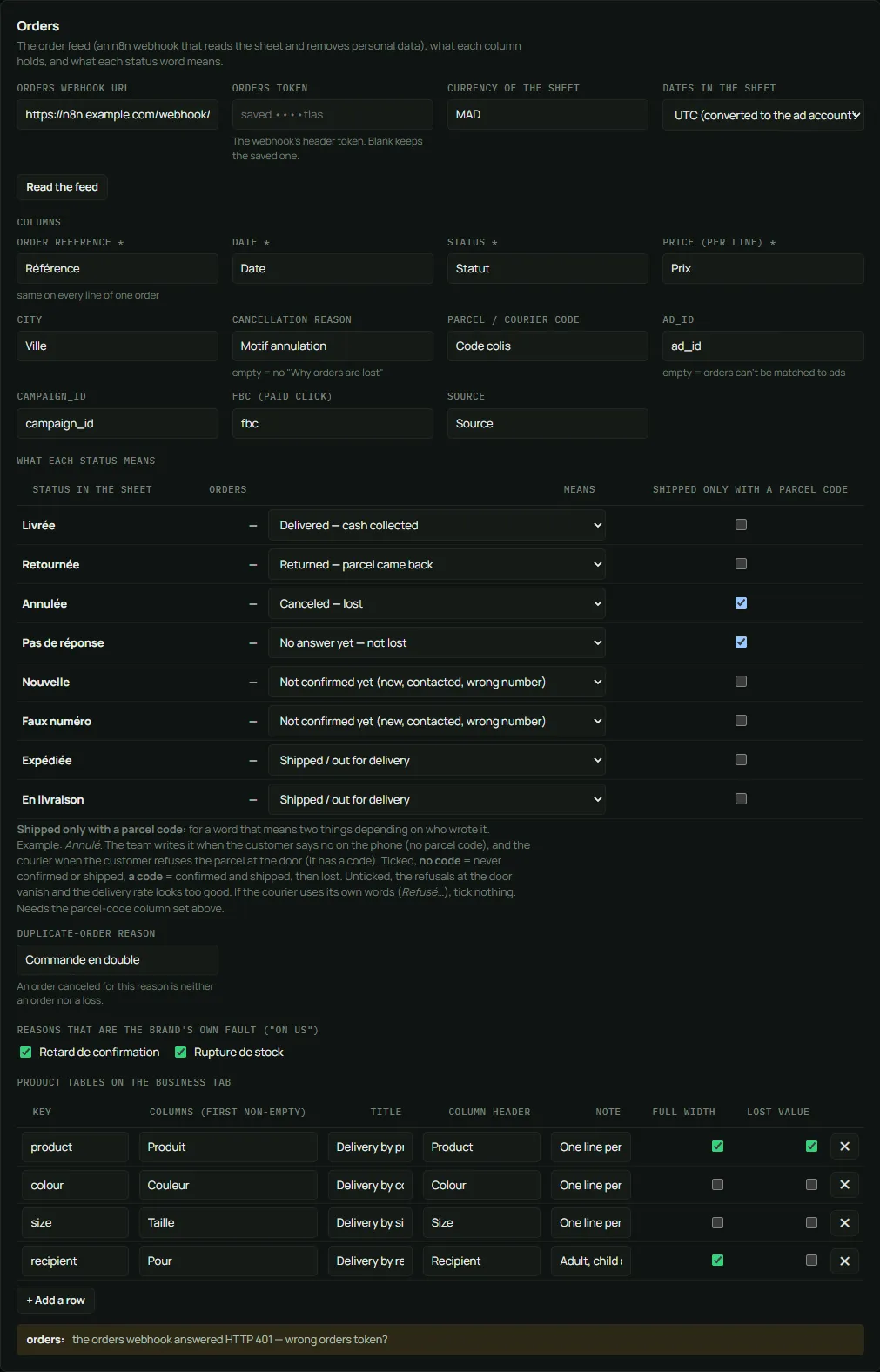
orders webhook HTTP 401 or 403 |
the orders key is wrong. In Setup → Orders, paste the right one and press Read the feed. |
orders webhook HTTP 404 or 500 |
the order feed is down. Tell Rewire. |
orders webhook returned no rows |
the feed answered with an empty sheet. The Portal treats that as a failed read, never as zero orders. Check your sheet, then tell Rewire. |
FX rate unavailable |
your ads are paid in one currency and your orders in another, and the exchange rate could not be read. Check your internet connection, then press Refresh. |
| a message from Meta | see Messages from Meta below. |
Press Refresh once it is fixed.
Stale · last good … / Showing the last good copy
Section titled “Stale · last good … / Showing the last good copy”
What it means. A refresh failed, so the dashboard keeps showing the last numbers it read correctly, with their time. Nothing is lost.
Fix. Read the reason in the note — it is one of those in Could not load the data. Often it is only a short internet cut: press Refresh.
Messages from Meta
Section titled “Messages from Meta”Meta’s reason is shown as Meta writes it, with a code at the end.
| Code | What it means | What to do |
|---|---|---|
| 190 | the key has expired or was revoked | a new key, in Setup → Meta |
| 10, 200, 273 | the key has no right to this ad account | in Business Settings, give the System User View performance on the ad account again |
| 4, 17, 613, 80004 | too many requests in a short time | wait 5 to 15 minutes, then press Refresh |
| 1, 2 | a passing problem on Meta’s side | press Refresh a little later |
Ads tab
Section titled “Ads tab”Could not load this breakdown
Section titled “Could not load this breakdown”Only the Breakdowns block failed; the rest of the tab is fine. It is usually Meta refusing too many requests at once (see the codes above). Pick the dimension again in a few minutes.
Orders can’t be matched to ads
Section titled “Orders can’t be matched to ads”Not an error: your order sheet has no ad_id column, so the Portal can’t tell which ad brought which order. The per-ad order blocks are hidden and the ad tables show Meta’s numbers only. To get them, your website must save the ad_id with each order — ask Rewire.
Showing 3 of 7 campaigns
Section titled “Showing 3 of 7 campaigns”Not an error: the Campaigns button limits the tab to some campaigns, ad sets or ads. Orders count only when their ad_id is one of the ads picked, so unmatched and organic orders are left out, and MER equals delivered ROAS. To see everything again, open Campaigns, press All, then Apply. See Choosing campaigns, ad sets and ads.
No campaign matches the campaign filter in this date range
Section titled “No campaign matches the campaign filter in this date range”The campaigns you picked did not run in these dates, or none fits Active / Inactive today, so Meta shows no spend or clicks. Orders can still appear: an order counts when its ad_id belongs to a campaign you picked by hand, even one with no delivery in these dates. Change the dates, or open Campaigns and pick others.
Spend is not the same as in Ads Manager
Section titled “Spend is not the same as in Ads Manager”It must be identical to the cent. Check that both show the same days and the same ad account. If they still differ, it is a bug: tell Rewire. See Your first analysis.
Business tab
Section titled “Business tab”A price or date in red on the Data health line
Section titled “A price or date in red on the Data health line”
A row of your sheet has a price or date the Portal can’t read (a letter in a price, a date in another format). It counts as zero. Correct it in the sheet, then press Refresh.
The numbers look wrong after a new status word
Section titled “The numbers look wrong after a new status word”A status word your team started using has no meaning set, so it counts as confirmed. In Setup → Orders, press Read the feed, give the new word its meaning in the status table, Save.
River tab
Section titled “River tab”Could not load the river
Section titled “Could not load the river”The reason follows. the River is not configured for this client: fill in Setup → River. A message from Meta: see Messages from Meta.
The screen check failed
Section titled “The screen check failed”| The reason says | What to do |
|---|---|
agent-browser could not start or is agent-browser installed? |
the screen check needs agent-browser on this computer — see Installation. |
timed out |
your page took too long to open. Check it opens on your phone, then run the check again. |
a screen check is already running |
wait for it to finish (about 20 seconds). |
Audiences tab
Section titled “Audiences tab”| Message | What it means | What to do |
|---|---|---|
| Could not load the audiences | the tab could read nothing | if the reason says no audiences configured, fill in Setup → Audiences; otherwise tell Rewire |
| The category counts are unavailable | the nightly customer counts could not be read; Meta’s part still shows | tell Rewire |
| Meta is unavailable | Meta could not be read; the categories still show | see Messages from Meta |
| The Google reviews could not be read | the nightly review check sent nothing | tell Rewire. The See all reviews button still works. |
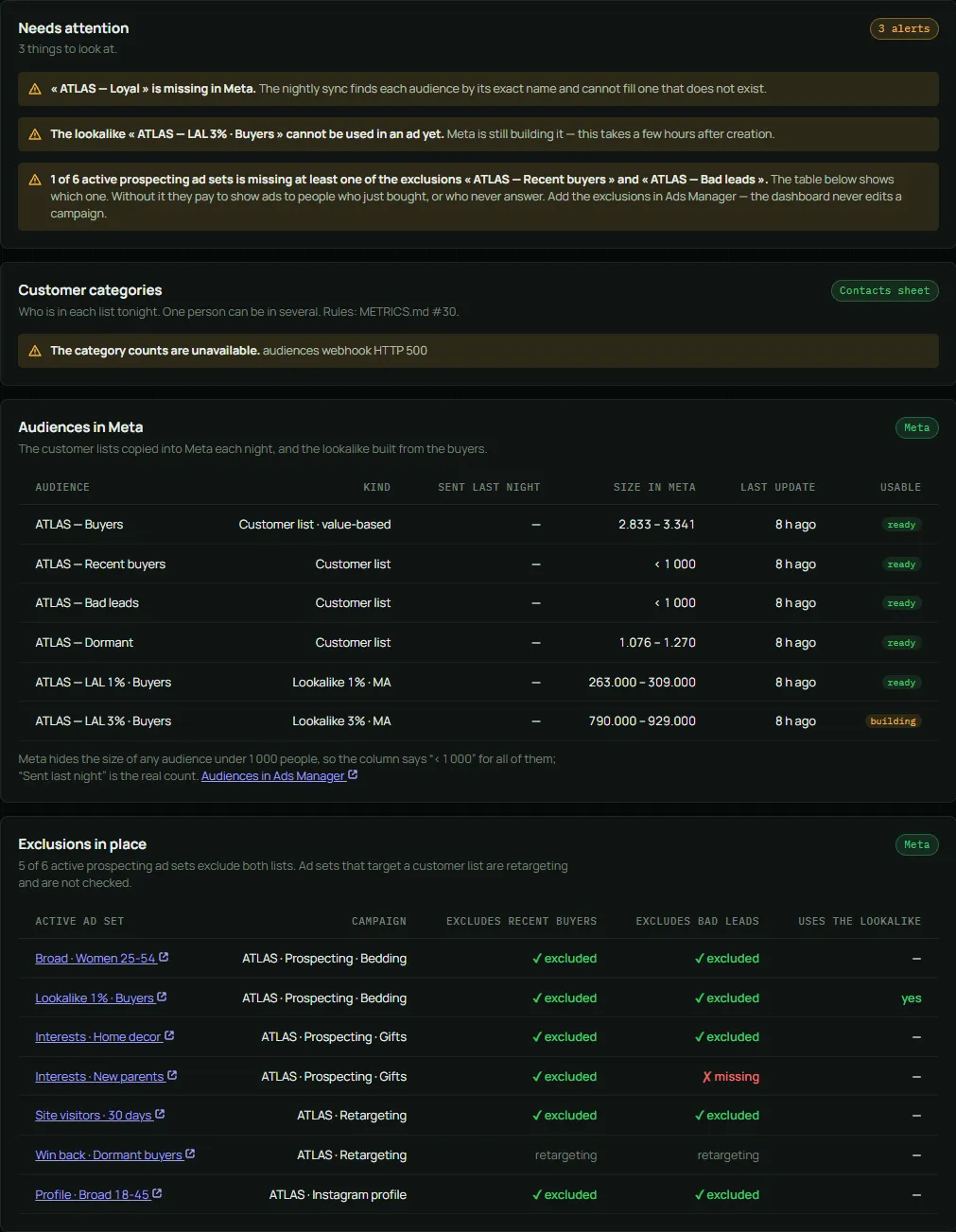
The alerts of the Needs attention block are explained on the Audiences page.
Recommendations and Explain
Section titled “Recommendations and Explain”Both run Claude on your computer. When a run fails, the card says why:

| The reason says | What to do |
|---|---|
Please run /login, Invalid API key, not logged in |
Claude is not logged in on this computer. Open a terminal, type claude, log in, run again. |
ENOENT, not found or not recognized |
Claude Code is not installed — see Installation. |
usage limit or rate limit |
your Claude plan’s limit is reached for now. Try again later, or pick a smaller model (Haiku). |
timed out after 15 min |
the analysis took too long. Run it again, or pick fewer skills or a faster model. |
output rejected |
Claude’s answer quoted no numbers, or was not in the expected shape, so the Portal refused it. Run it again. |
a run is already in progress / an explanation is already running |
one at a time: wait for the current one to finish. |
no orders source configured |
fill in Setup → Orders first. |
Setup page
Section titled “Setup page”Messages under a button
Section titled “Messages under a button”Each button tests one thing and answers right under it.
| Message | What to do |
|---|---|
no Meta token: paste one first |
paste the key in Meta token. |
pick the ad account first |
press Load my ad accounts and choose one. |
the Meta token and ad account come first |
fill in the Meta section before the River. |
enter the orders webhook URL first / enter the audiences webhook URL first |
Rewire gives you this address; paste it. |
cannot reach … |
the address is wrong or the feed is down. Check it; if it is right, tell Rewire. |
the orders webhook answered HTTP 401 / 403 — wrong orders token? |
paste the right orders key. |
the orders webhook returned no rows |
the sheet behind the feed is empty or unreachable. Tell Rewire. |
the audiences webhook answered HTTP … / returned no categories |
the audiences feed has a problem. Tell Rewire. |
set the River domain and its stages first |
fill in the domain and at least one stage, then compute the targets. |
Not saved — fix these first
Section titled “Not saved — fix these first”
Save first checks that every section is complete. Nothing is written until the list is empty.
| Message | What to do |
|---|---|
Business: the name is empty |
give the business a name. |
Meta: pick the ad account |
choose it in Meta. |
Meta: the attribution setting is empty |
tick at least one window — usually 7-day click, 1-day view. |
Meta: the custom event needs its event and a label |
pick the event and name the column, or untick Custom pixel event. |
Orders: the webhook URL is missing or not a URL |
paste the feed address, starting with https://. |
Orders: the currency must be a 3-letter code |
MAD, EUR, USD… |
Orders: choose the … column |
pick the reference, date, status and price columns. |
Orders: status list "…" is broken / at least one status must mean "delivered" |
fix the status table; at least one word must mean delivered. |
Orders: product table … needs a unique key / needs its columns, a title and a label |
complete that product table, or remove it. |
Pack mix: pick one of the product tables, and name it |
choose the table and write its name, singular and plural. |
Pack mix: every thin-margin rule needs a label and a "match" |
see Pack mix. |
Courier: the name is empty |
name your courier, or untick the section. |
Audiences: … |
the address, the name prefix, at least one Meta list, and a key and label for every category — see Audiences. |
River: the website domain is missing |
just the domain, like mybrand.ma — no https://, no /. |
River: every site stage needs a key, a name, a pixel event and a label / a stage key is a-z, 0-9 and _ only |
complete the stage rows; keys like add_to_cart. |
River: the baseline must be a number of days |
90 by default. |
River: the screen-check URL is not a URL |
a full address, starting with https://. |
Recommendations: … must be a number |
a number only, no currency or % sign: 0.65, not 65 %. |
Then Save tests each connection for real:

| Message | What to do |
|---|---|
Meta: cannot read ad account … with this token |
see Messages from Meta. |
Orders: these columns are not in the feed |
a column was renamed in the sheet. Press Read the feed and pick it again. |
Orders: … or Audiences: … |
the same messages as under the buttons, above. |
Saved. Worth a look · Also
Section titled “Saved. Worth a look · Also”Warnings, not errors: they never stop a save. They show under Saved. Worth a look, or under Also next to errors.
| Warning | What it means |
|---|---|
Meta: the ad account spends in …, orders are in … |
normal if your ads are paid in dollars and orders in dirhams: spend is converted at the day’s rate. |
Orders: "…" has no meaning set, so it counts as confirmed |
give that status word its meaning in the status table. |
Orders: the columns changed |
the order feed must be updated to send the new columns. Tell Rewire. |
Courier: … is missing or has no "fees" |
the courier’s price list is missing; the price column stays empty. Tell Rewire. |
Recommendations: the media plan … was not found |
Claude will run without your media plan. Tell Rewire. |
Adding a business
Section titled “Adding a business”| Message | What to do |
|---|---|
the id is 2 to 31 characters: a-z, 0-9 and - |
lowercase letters, digits and dashes only. |
the name is empty |
give the business a name. |
clients/… already exists |
that folder name is taken: choose another. |
When the Portal starts
Section titled “When the Portal starts”The black window that opens with the Portal names every business it starts.
| You see | What to do |
|---|---|
✗ … stopped — check clients/…/config.json |
that business’s settings file is damaged. The others still run. Tell Rewire. |
No business yet: created clients/my-business |
first start: open the address it gives and fill in the Setup page. |
| A business is missing from the dropdown | look for its ✗ line in the window. |
| The page doesn’t open at all | the window must stay open while you use the Portal. Start it again with start.cmd (./start.sh on a Mac). |
refused: open the Portal at localhost |
open it at the http://localhost:… address the window gives, not with another name or address. |