
River
The River follows people from the ad to the order, one step at a time. The ad steps (hook, hold, click) are always the same; this section describes your website’s steps.
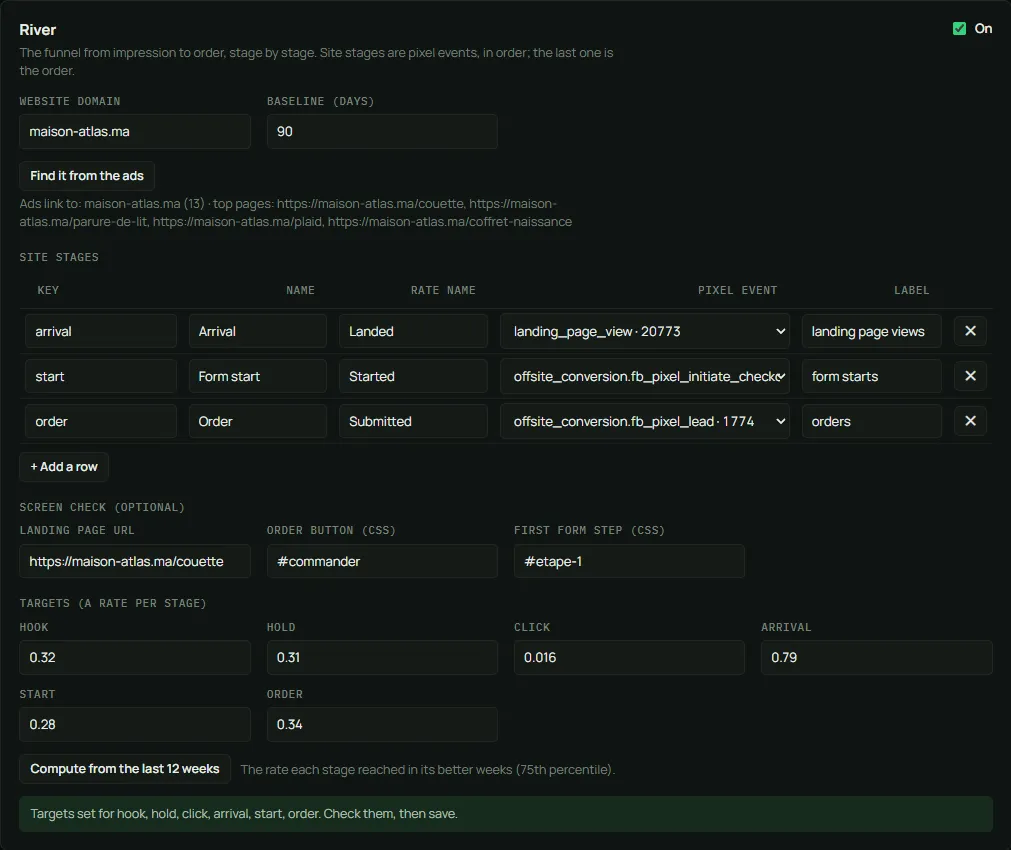
Your website
Section titled “Your website”| Field | What to put |
|---|---|
| Website domain | just the domain, like maison-atlas.ma. Press Find it from the ads: the Portal lists the domains and pages your ads send people to. Only ads that send people to this domain count in the River — an ad to your Instagram profile would otherwise look like a broken landing page. |
| Baseline (days) | how far back your normal is measured: 90 days by default. See baseline. |
The site stages
Section titled “The site stages”One row per step of your website, in order; the last one is the order itself. Each step is one event your website sends Meta.
| Column | Maison Atlas, first row |
|---|---|
| Key | arrival (short, no spaces) |
| Name | Arrival |
| Rate name | Landed |
| Pixel event | landing_page_view — pick it from the list once Meta is read |
| Label | landing page views |
Maison Atlas has three steps: Arrival (the page loaded), Form start (someone started the order form) and Order (the form was sent).
Screen check (optional)
Section titled “Screen check (optional)”The screen check opens one landing page at phone size and measures it. Give it the page’s address; the two other fields (the order button and the first form step) tell it where to look on the page — Rewire fills them.
Targets
Section titled “Targets”One rate per step: the level you want it to reach. Press Compute from the last 12 weeks: each step gets the rate it reached in its better weeks — a target you have already hit, not a wish. Check them, change any you like, then Save. They feed Room to grow on the River tab.