
Audiences
This section powers the Audiences tab. It needs Rewire’s nightly automations, which sort your customers into categories and copy the lists into Meta — so Rewire fills most of it. The dashboard only ever receives counts, never a person.
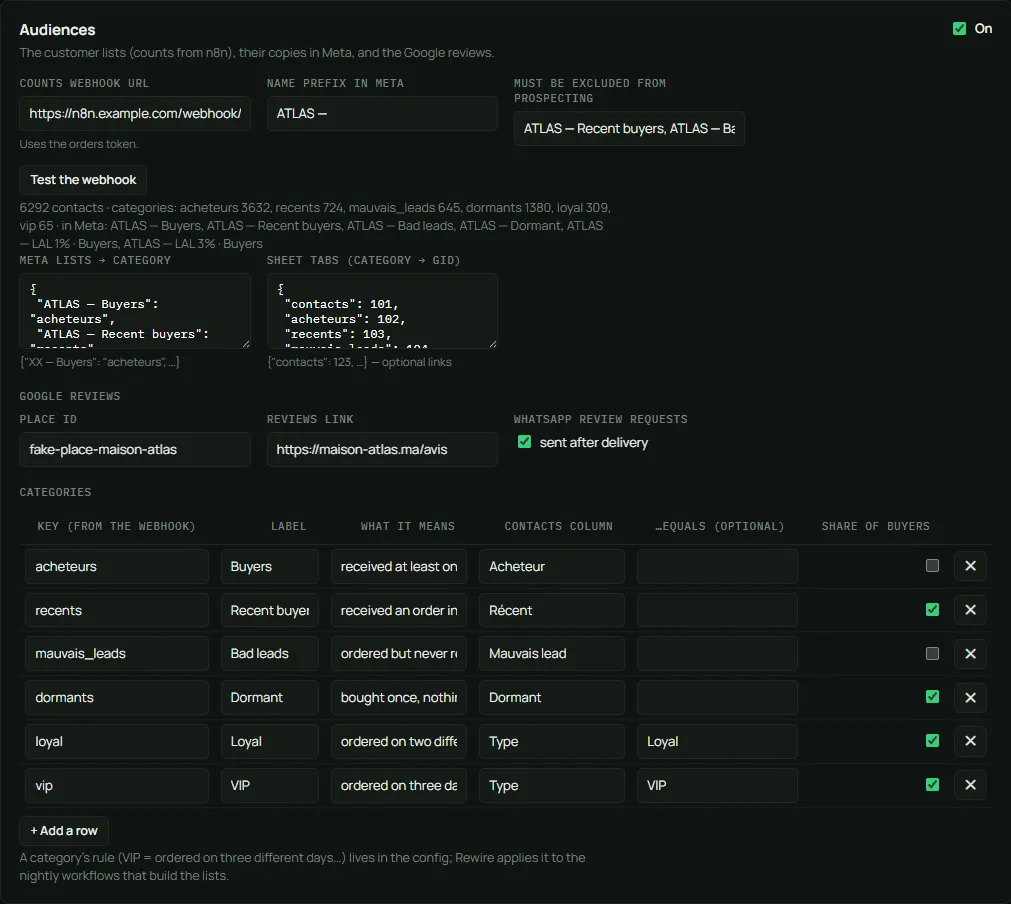
The lists
Section titled “The lists”| Field | What it is |
|---|---|
| Counts webhook URL | the address of the automation that counts your customers, from Rewire. It uses the same key as the order feed. |
| Name prefix in Meta | how your lists start in Meta, so the dashboard finds them: ATLAS — for Maison Atlas |
| Must be excluded from prospecting | the exact names of the lists every prospecting ad set should leave out — usually recent buyers and bad leads. The Audiences tab warns you when one is missing. |
| Meta lists → category | which Meta list holds which category, for example "ATLAS — Buyers": "acheteurs" |
| Sheet tabs | optional: links from each category on the Audiences tab to its tab in your sheet |
Press Test the webhook: under the button you see how many contacts and customers per category the automation counts, and which of your lists already exist in Meta.
Google reviews
Section titled “Google reviews”| Field | What it is |
|---|---|
| Place id | your business on Google Maps, so the nightly check finds your reviews. Rewire looks it up. |
| Reviews link | the page where you answer your reviews; the tab links to it |
| WhatsApp review requests | tick it if a WhatsApp message asks your customers for a review after delivery. The tab then also counts the requests sent. |
Categories
Section titled “Categories”One row per customer category shown on the Audiences tab: the key the automation uses, the label you see, one line saying what it means, and whether to show it as a share of buyers. The rule that puts a customer in a category is kept with Rewire’s nightly automations; the table only says how to show it.